|
LogSat Professional keplerian elements | ||
|
|||
|
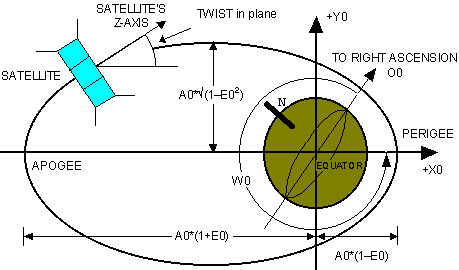
What are Keplerian Elements? | Orbital Elements and Nomenclature 
Keplerian Elements are a set of numbers which allow satellite tracking programs to calculate a satellite's position in space. Top ^ The keps, or 2line elements, as they are sometimes called, give us specific information about a satellite's orbit at a specific moment. Once these elements are known for a specific time, the satellite's position in space can be predicted using complex mathematical calculations. There is, however, one problem. Keps are given for a specific time. The accuracy of the position prediction degrades as time goes by. The predicted position of a satellite using 7 days old keps is more accurate than a prediction using 3 months old keps. Another factor to take into consideration is the height of the satellite's orbit. High orbiting satellites, as the Oscar 13, suffer much less from the effect of the earth's atmosphere and gravity than lower orbiting satellites, as the Mir and the Russian Radio Sputnik (RS) satellites. Thus the age of keps has a lower influence on predictions for high orbiting satellites than for the low orbiting ones. We suggest updating the keps every 2-3-4 weeks, depending on the height of the satellite in which you're interested. Update every couple of weeks for low orbiting satellites, and every 4-5 weeks for high orbiting ones. Orbital Elements and Nomenclature Top ^
Calculating the Squint Angle Top ^
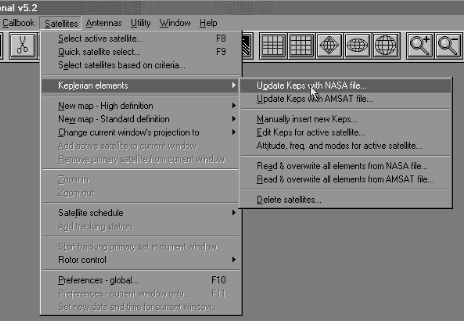
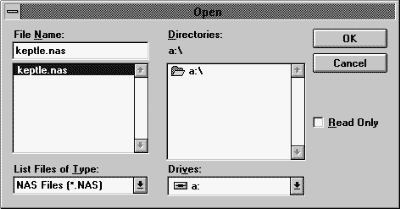
Updating Keplerian Elements With LogSat Top ^ LogSat greatly simplifies the task of keps updating. Everything is done with a few mouse clicks. First of all you need to download from the Internet the file with the updated keplerian elements. We suggest you save it in the LogSat directory. Then from LogSat click on Satellites from the menu bar. Then go down to Keplerian Elements, and across to Update elements with NASA file. The familiar Open box will pop, allowing you to select the file containing the keps.
If you have used the links above to download the kep files, and have followed our suggestion to save the file in the LogSat directory, the file will appear right away in the Open box. If it doesn't, click on the List Files of Type box and change the file extension to either (*.TLE) or (*.*). Navigate to the directory in which you stored the file, select it and click on the OK button. This will update LogSat satellite database.
LogSat is able to read kep files in both NASA's 2line and AMSAT style format. Some files are formatted for Unix computers. LogSat can read these as well. If the file is downloaded from a BBS or via packet radio, it might contain headers which are not part of the keps. Some tracking programs require that you delete these lines before updating the keps. LogSat instead is able to filter them out so you can use these files without having to modify them.
Space Debris Top ^ Sometimes 2line keps files will carry
thousands of satellites in them. But hundreds of these 'satellites' are actually debris
(rocket parts) resulting from the satellite launch. LogSat can automatically detect these
parts and erase them from the satellite database, thus greatly reducing its size. Of
course you can also choose to delete satellites which have entered the atmosphere or those
with old keps. Download latest Keplerian elements
Pseudo keps for the Moon. Use the following elements to track the Moon for the year 2015: |
||
|
Spam Filter ISP - Copyright © 2003-2011 LogSat Software LLC. All rights reserved. PO BOX 916340 Longwood, FL 32791 USA.
Customer Service: sales@LogSat.com |
|||