In order to use SPAMFilter ISP, our anti spam filter gateway, you need to configure your SMTP network to have SPAM Filter ISP handle all of your incoming email.
Following are several typical deployment scenarios that can be used as a starting point for your implementation.
SMTP servers directly connected to Internet
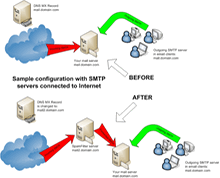
To implement our SPAM Filter server with minimal impact you would do the following.Configure SPAM Filter to listen on a different IP, for example on mail2.domain.com. This can be done by installing SPAMFilter either on a separate separate server or the same server provided it has multiple IP addresses assigned to it.Reconfigure the MX record to point to mail2.domain.com.Your SPAM Filter server will now be receiving all internet email and will then forward legitimate emails to your SMTP server at mail.domain.com. Your existing customers still have mail.domain.com for SMTP server in their email client configuration, nothing will have changed for them.
Single SMTP server with a single IP address directly connected to Internet
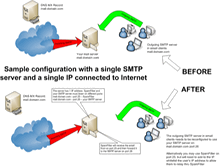
In this configuration the SPAM Filter gateway is installed on the same server as your SMTP software. The server only has one IP address available, SPAM Filter will need to be configured to listen on port 25 so it can accept email traffic. Your SMTP software will need to be reconfigured to listen on a different port, for example port 26. SPAM Filter will then forward clean emails to your SMTP server on port 26.All your email clients will need to be reconfigured so that their "Outgoing SMTP server" now points to your SMTP server on port 26. Alternatively, you may choose to let your email clients relay thru SPAMFilter. Please note that in order to do so, you will need to configure IP whitelists in SPAM Filter to specify the IPs from which your clients can relay from (note - there are no changes needed to clients if they connect to an Exchange server).
SMTP servers behind Firewall
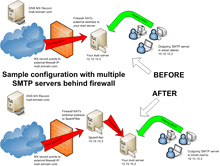
This is one of the simplest configurations to implement.Install our SPAM Filtering software on a standalone server.Reconfigure the firewall so that it routes the external IP address to the IP assigned to SPAM Filter.The SPAM Filter server will now be receiving all internet email and will then forward legitimate emails to your SMTP server.
Single SMTP multihomed server behind Firewall
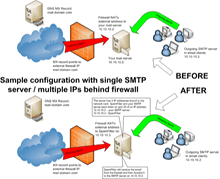
Configure SPAM Filter to listen on a different IP than your SMTP server. This can be done by assigning additional IP address to the server.Reconfigure the firewall so that it routes the external IP address to the IP assigned to SPAM Filter.The SPAM Filter gateway will now be receiving all internet email and will then forward legitimate emails to your SMTP server.
Single SMTP server behind Firewall
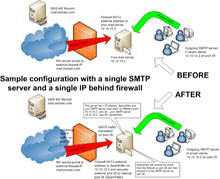
In this configuration our SPAM Filtering software is installed on the same server as your SMTP software. The server only has one IP address available, SPAMFilter should be configured to listen on a port other than 25 so it does not conflict with your SMTP Server, for example port 26. Your SMTP software will not need be reconfigured.Reconfigure the firewall to perform port mapping so that it routes the external SMTP traffic from port 25 to port 26 on the IP assigned to SPAM Filter.If the firewall does not support port translation, this configuration can't be implemented. Please refer to the "Single SMTP server with a single IP address directly connected to Internet" example above for an alternate solution.